Google image provenance
Gemini watermark checker: SynthID and C2PA
Inspect Gemini, Imagen, and Nano Banana JPEG, PNG, and WebP files for C2PA and metadata. Continue to Google’s official verification to check the separate embedded SynthID signal.
- JPEG, PNG, and WebP
- Credential validation and trust
- Official SynthID guidance
- Checking service
- Choose file
- Inspect content
- View report
Step 1 of 4: Checking service.
Service check
Preparing the provenance inspector
Confirming the inspection service is ready before anything is sent.
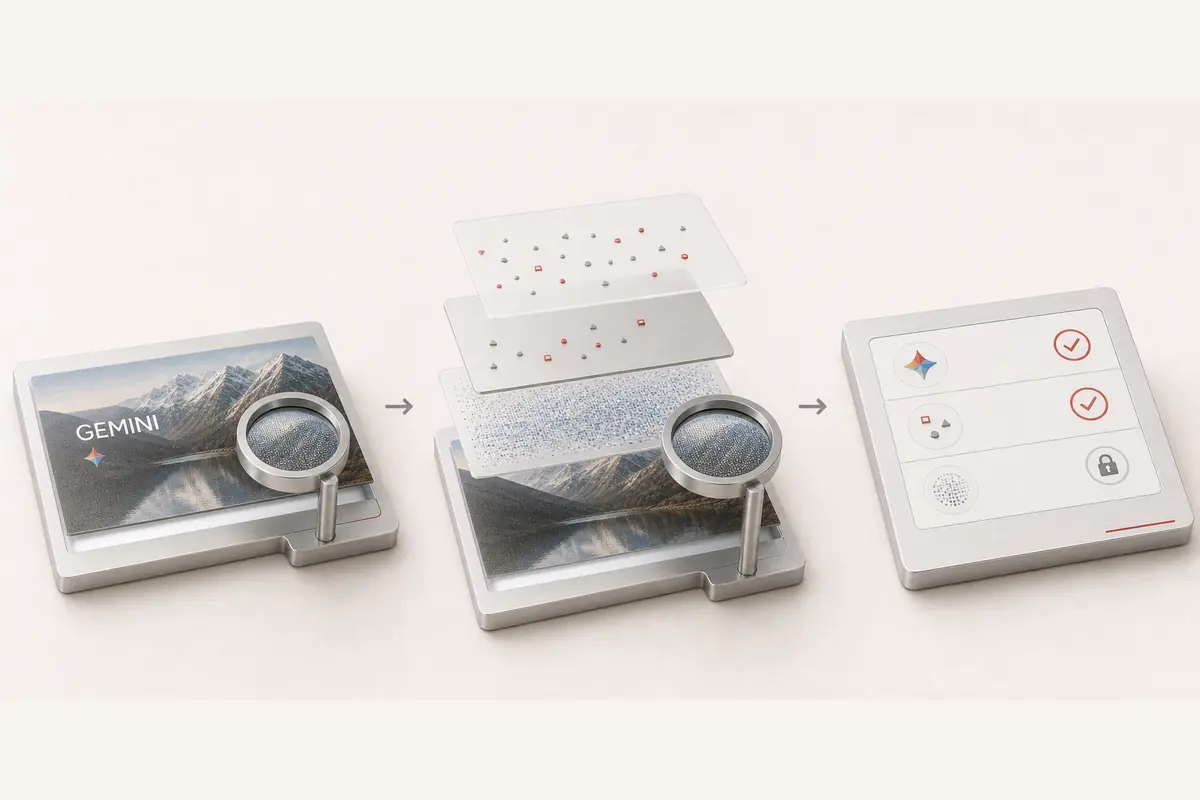
Three different signals in a Gemini image
A visible sparkle, signed Content Credentials, and SynthID answer different questions. This file workflow reports the metadata and credentials it can inspect, then identifies the compatible provider check needed for the embedded signal.
C2PA and metadata
See recorded software, AI-source declarations, signature validity, and signer trust when those fields are returned.
Embedded SynthID
The local file pass does not decode SynthID. Use the linked official Gemini verification instructions for that signal.
Visible sparkle
A recognizable logo is visible pixel content. Its presence does not establish that SynthID was tested.
Open-source scope
SynthID Text requires the matching text watermark configuration. It is not a decoder for Gemini image watermarks.
Understand results across different files
Compare the original export with the copy you received. These examples explain possible outcomes; your report reflects only the checks completed on your submitted file.
- Original Google JPEG, PNG, or WebP export with credentials
- Parsed credential with validation and trust states
Inspect recorded actions and the signer. Only valid, trusted provenance can support stronger attribution; a manifest's presence alone is insufficient.
- Credential with a broken signature or content binding
- Invalid credential
The file failed the reported integrity check. Do not treat its claimed generator or issuer as verified authorship.
- Unsigned software tag naming Google
- Declared source only
A software name can be edited or copied. It is a useful lead, not a verified provider watermark.
- Screenshot, re-encoded, or stripped copy
- No credential found, or reduced evidence
This copy may have lost its file records. Missing metadata does not establish human origin or absence of an embedded watermark.
- Image with SynthID but no surviving metadata
- Embedded signal not tested locally
Use a compatible SynthID verifier. A visible sparkle or Google metadata string is not evidence that this embedded signal was decoded.
How to check your content
Upload the original image
Choose a Gemini, Imagen, or Nano Banana JPEG, PNG, or WebP export up to 10 MB.
Review C2PA and metadata
Check any returned generator, AI-source declarations, signature validity, and signer trust. Editable fields remain declarations.
Continue to Google's SynthID check
Use Gemini's verification feature for its supported embedded signals. Compare the results without equating missing credentials with a negative SynthID result.
Evidence you can use
Every report separates cryptographic credentials, declared metadata, and provider-controlled verification. You can see exactly what ran before deciding what the file proves.
- C2PA Content Credentials parsing and cryptographic validation for supported files.
- Declared EXIF, XMP, IPTC, container, and generator metadata evidence.
- A precise boundary and official path for provider-controlled verification when one exists.
Frequently asked questions
How can I check a Gemini or Nano Banana image?
Upload the original JPEG, PNG, or WebP for C2PA and metadata inspection here. For the embedded SynthID signal, use Google's documented verification feature in Gemini and keep its result separate.
Does this local scan decode SynthID?
No. It reports supported file metadata and credentials. A SynthID result requires a compatible verifier; a filename, a Google software tag, or a visible sparkle is not that result.
Can the open-source SynthID Text model detect Gemini images?
No. The public implementation is for text generated under a known watermark configuration. It is not an image detector and does not provide a universal key for Google's production media.
Is the visible Gemini sparkle the same as SynthID?
No. The sparkle is visible pixel content, SynthID is an imperceptible embedded signal, and C2PA is signed provenance metadata. A check for one layer does not determine the other two.
Does a negative SynthID result prove an image is real?
No. Coverage depends on the verifier, generating tools, content, and later modifications. Google documents uncertainty for limited-detail content and very small edits; other AI systems may use different marks.
Can metadata removal delete SynthID?
Metadata removal changes file records. It does not itself inspect or remove a signal embedded in the media; edits and re-encoding can affect detectability in different ways.
Can Gemini verify Content Credentials as well as SynthID?
Google documents signed-in Gemini verification for SynthID and compatible Content Credentials. These are separate checks with their own supported formats and limits. Follow the linked Google instructions for that service; uploading here does not automatically send a file to Google.